

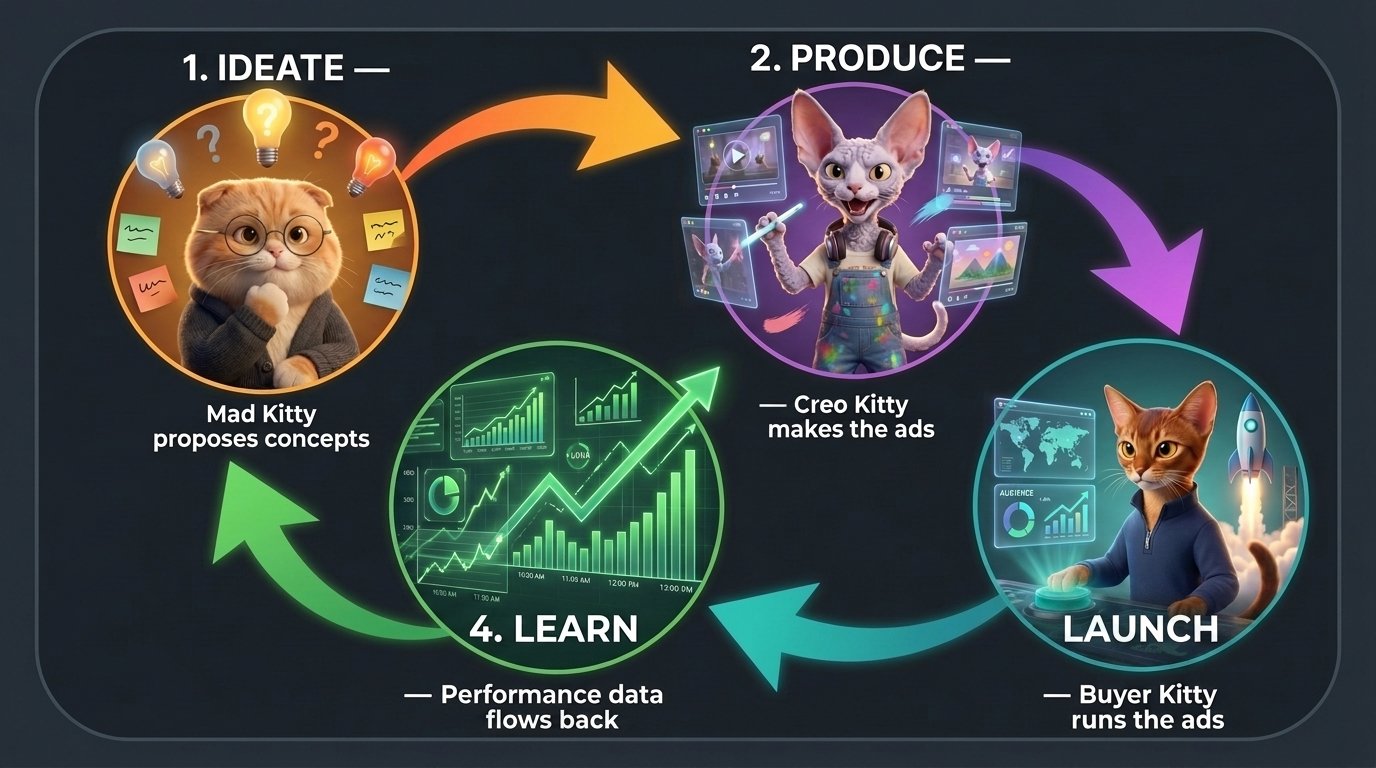
Phase 0 — Setup (once per project)
Before the loop can spin, Roy needs to know your business./setup covers it: brand brief from your website, languages, performance targets (minimum ROAS, target CPA, daily spend), compliance rules, reference ads, logo, and the Facebook connection. See the Quickstart for the walkthrough.
Your targets aren’t paperwork — the minimum ROAS you set here is what later defines “fatigued” for every ad you run.
Phase 1 — Ideate (Roy)
Ideation is structured, not random: Roy defines audiences (who you’re talking to, and how aware they are), picks angles (the argument to make to each), and proposes creatives as executions of those angles — cards with an idea, a hypothesis, and the target audience. See Audiences & Angles for the theory. Early on it draws on your brief, your reference ads, and competitor research (/competitor). Once data exists, it draws on what’s actually working (/review).
Your decision: which concepts get greenlit. Approving a card is what kicks off production.
Phase 2 — Produce (Crea)
Each approved concept becomes a creative with its own Crea. It produces statics and/or video, writes the copy, and localizes to every project language. You iterate in chat until it’s right, then/publish finalizes the assets in all sizes.
Your decision: when it’s good enough. Publishing moves the creative to ready to launch on the kanban.
Phase 3 — Launch & Manage (Bidder)
Bidder sees ready creatives in its account snapshot and drafts a plan: what to launch where, at what budget — plus ongoing management: scale winners, pause fatigued ads, duplicate into new adsets, restructure campaigns. Your decision: approve or reject the plan. Approved actions execute on Meta automatically, action by action, with per-action status. Nothing runs without sign-off.Phase 4 — Learn (automatic)
Performance syncs from Meta every hour. Every creative gets a performance tier — top performer, rising star, rookie, dormant, new — plus a fatigued flag when its ROAS slips below 80% of your target over the trailing 14 days. Tiers appear as badges on the kanban. That data feeds both ends of the loop:- Roy’s daily portfolio review — delivered to your inbox every day: what moved, what’s fatiguing, and which audience–angle combinations deserve the next test. See The loop runs on a schedule.
- Bidder’s next plan — scale/kill decisions grounded in real numbers.
- Roy’s next concepts —
/reviewtells you which audiences, angles, and formats are winning;/save_formatturns a winner into a reusable recipe. - The cats’ memory — learnings persist across cycles. See Memory.
The loop runs on a schedule
You don’t have to remember to turn the crank. Every project ships with two automations, on by default: Daily portfolio review — once a day, Roy runs a full/review of the portfolio in a fresh session and delivers the report to your inbox: what moved, what’s fatiguing, which audiences, angles, and formats are winning, and proposals for the next round of concepts. This is your standing touchpoint with the team.
Creative iterations — once a live creative has 3+ days of fresh data, its test gets analyzed automatically: did the hypothesis hold, and what should the next variation try? Each analysis lands on the creative’s timeline. If you later relaunch an iteration, it’s re-analyzed once that launch has 3 days of data — so every concept becomes a chain of tested variations, not a one-shot bet.
Both run in review-then-approve mode by default: they suggest, you decide. Each has an opt-in auto-produce switch — Auto-produce iterations dispatches approved iterations right after the daily analyses finish, and Auto-produce proposed creatives sends the review’s concept proposals straight into production. Flip them on when you trust the loop.
Everything is tuned per project on the Automations page: change the time or timezone, pause either one, or add your own — any prompt you’d give Roy can run on a schedule (a Monday competitor check, a Friday spend summary). An automation that keeps failing pauses itself and tells you in the inbox.
Then it’s back to Phase 1 — with a team that knows more than it did last cycle.